Data & Dashboards
Most businesses have the data they need. The problem is that it lives in five different places, arrives in three different formats, and takes someone two days a week to pull together into something readable.
What this engagement covers
Data analysis work almost always starts the same way - with a collection of files, exports and spreadsheets that nobody has managed to connect into a coherent picture. Sales data from one system, payment data from another, operational data from a third. Each in its own format, each requiring manual handling before anything useful can be extracted.
My approach is to build a single consolidated model - typically in Excel with custom VBA automation - that pulls from all relevant sources, applies the reconciliation logic, and produces a clean, interactive report. The complexity moves under the hood. The person using the result just opens a file and gets answers.
I work primarily in Excel with VBA, and deliberately so. Most companies already have Excel deployed everywhere. There is no new software to license, no new system to learn, no IT project to manage. The result is a tool that actually gets used - not a dashboard that requires specialist knowledge to operate or maintain.
How it works
Sales reconciliation across three independent data sources
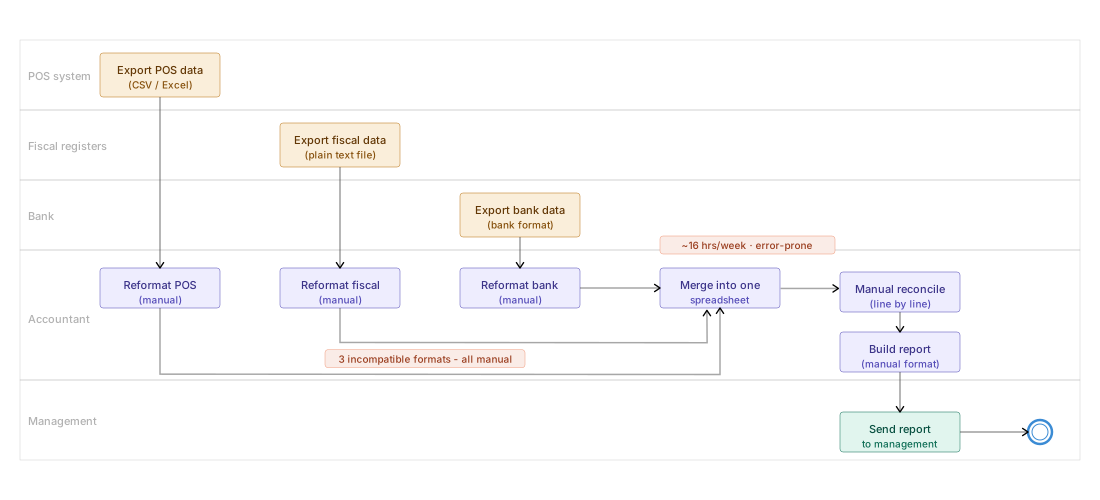
A retail company operating 250 stores collected sales data from three separate systems - an internal point-of-sale register, fiscal cash register devices with cloud-connected storage, and bank card payment terminals with separate bank exports. Each source used a different file format; one was a plain text file. The data had to be reconciled weekly, and before this project, a single accountant spent nearly two full working days every week on the task - downloading, reformatting, manually matching and building the summary report.
The accountant downloaded exports from three systems independently, reformatted each to a common structure manually, then compared them line by line in a spreadsheet. Discrepancies were noted manually and compiled into a report. The entire process - from raw exports to finished report - took approximately 16 working hours per week. Errors in the manual process were common, and the accountant had little time for any actual analysis.
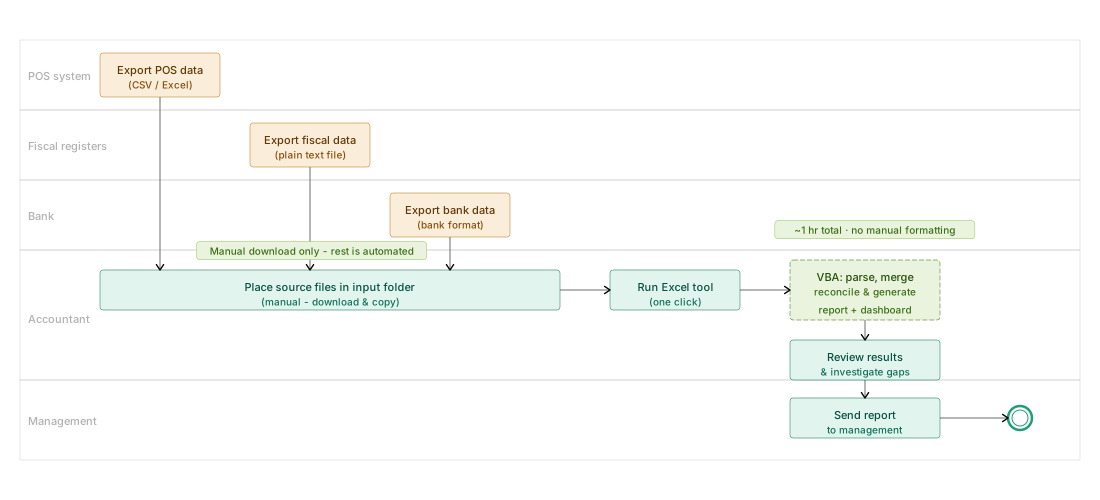
A consolidated Excel tool with VBA automation was built to handle the entire import and reconciliation pipeline. The accountant downloads the three source files, places them in a designated folder, and runs the tool. It parses all three formats automatically, applies the reconciliation logic, and produces both the full consolidated report and the discrepancy dashboard in a single operation. Total time from raw files to finished report: approximately one hour - most of which is the manual download step itself.
Discrepancy dashboard - what the output looks like
The primary deliverable was a two-layer Excel workbook: a consolidated data sheet with full drill-down capability, and a summary dashboard showing the reconciliation status at a glance. The dashboard was designed to answer one question immediately: where are the discrepancies, and how large are they?
The dashboard displays a matrix of stores versus dates. Each cell shows the discrepancy amount and type where one exists, highlighted in red. Cells with no discrepancy are clean. The accountant can see at a glance which stores require investigation on which dates - and go directly to the source data for those specific cases, rather than reviewing everything manually.