Process Mapping & Documentation
Most business processes exist only in people's heads. When the right person is absent, the process stops. When someone new joins, they spend months figuring out how things work. When you need to hand something off, automate it, or explain it to an auditor - there is nothing to show.
What this engagement covers
Process mapping is the work of making the invisible visible. It is not about finding problems or recommending improvements - it is about creating a clear, accurate, shared picture of how a process actually works: who does what, in what order, under what conditions, and who is responsible for each step.
The trigger is usually one of these: a process lives entirely in someone’s head and the business is at risk if that person leaves. A new system needs to be implemented but no one can explain the current workflow clearly enough to configure it. A regulatory audit is coming. A function is being outsourced. A new employee needs to understand how things work without spending six months shadowing colleagues.
The output is documentation - BPMN process diagrams, written procedures, responsibility matrices - that makes the process understandable to anyone who needs to work with it, regardless of whether they were in the room when it was created.
How it works
Production order placement - process mapping across 5 roles
A retail company needed to document their production order placement process before implementing a new ERP system. The process involved five departments and had never been formally described. Each person knew their own part, but no one had a complete picture. The project started with the client's own words: 'Someone does something somewhere, but I have no idea who is responsible for what.' The diagrams below show a fragment of the mapped process - three consecutive stages, each shown in detail. The process is intentionally shown in a simplified form for ease of presentation within this site
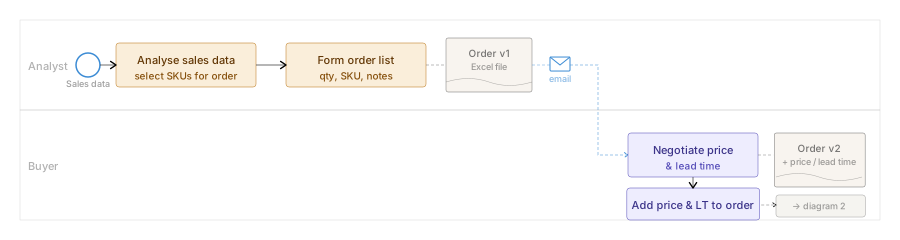
The analyst reviews sales data, selects SKUs and forms the initial order list as an Excel file (Order v1). The file is sent by email to the buyer, who negotiates price and lead time with the manufacturer and adds these to the order (Order v2). The completed file is then passed to the senior analyst for economic review.
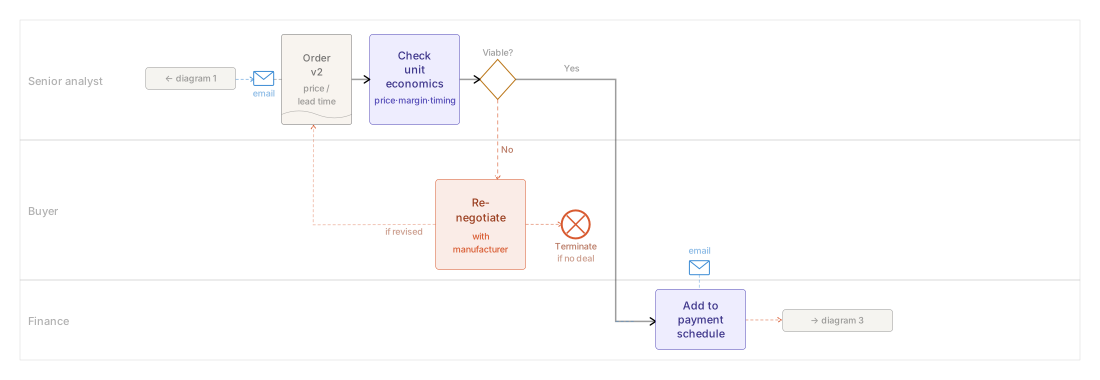
The senior analyst checks unit economics against the agreed price and timing. If the order is not viable, it is returned to the buyer for re-negotiation - or terminated if the manufacturer cannot meet revised parameters. If viable, the order passes to finance for payment scheduling.
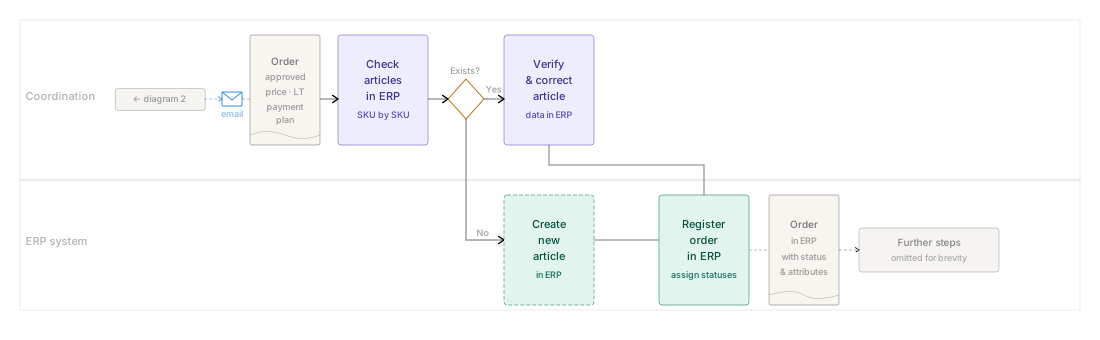
The coordination team checks each SKU in ERP. Existing articles are verified and corrected if needed; new articles are created. The order is then registered in ERP with all required statuses and attributes - replacing the original Excel file as the document of record.